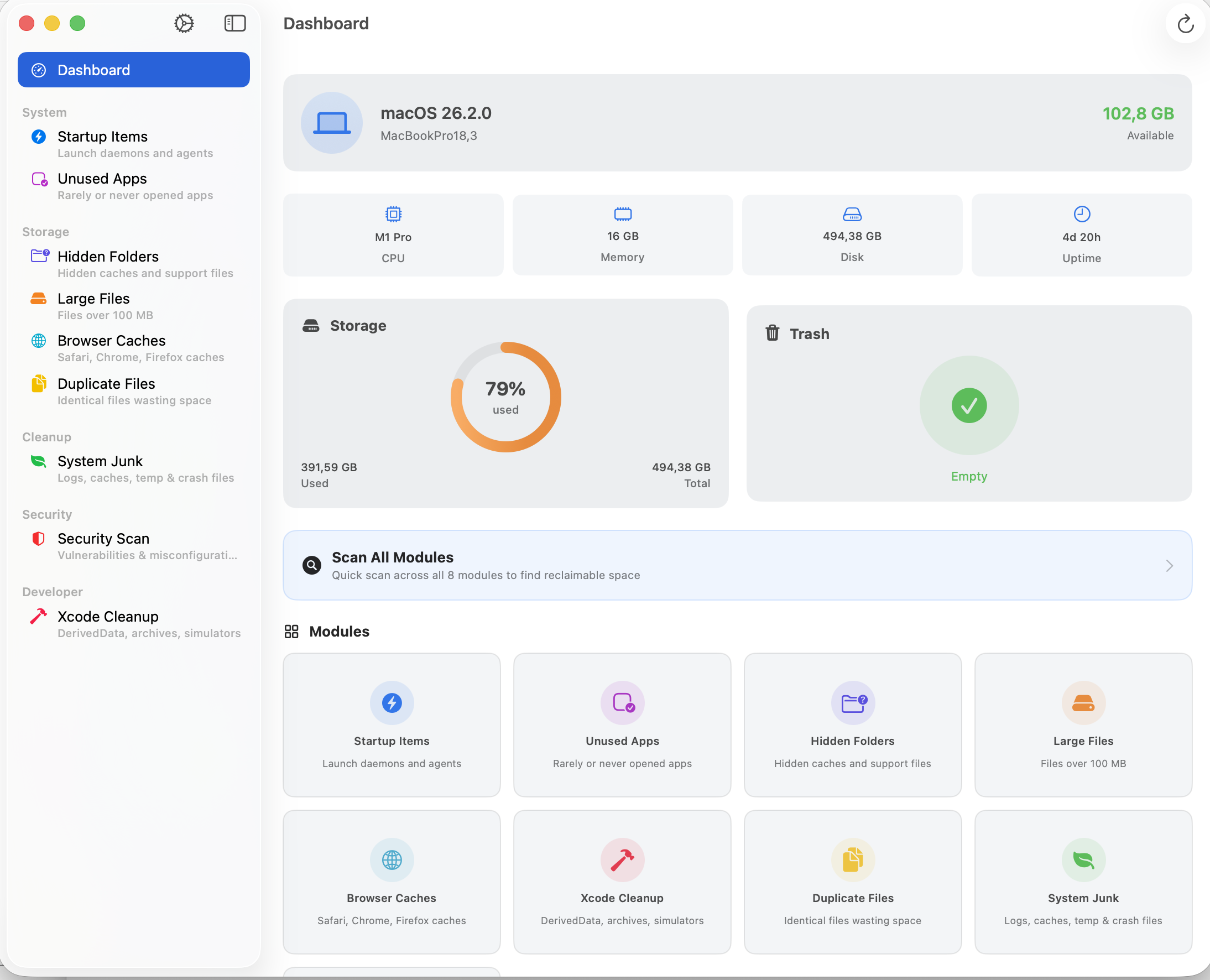
macOS System Optimizer: AI That Knows What’s Safe to Delete
Users waste hours deciding which files to remove. We built a native macOS app with 8 cleanup modules
and an LLM-powered recommendation engine that classifies every file as “safe to remove”,
“review recommended”, or “essential — keep”.
8
Cleanup modules (comprehensive coverage)
2
LLM backends (Claude API + Ollama)
3-tier
AI classification (safe / review / keep)
100%
Native SwiftUI (zero Electron bloat)
The Problem
Mac users accumulate gigabytes of hidden junk — Xcode derived data, browser caches, orphaned app support
folders, duplicate files, forgotten startup items. Existing cleanup tools either take a brute-force approach
(delete everything) or require users to manually evaluate hundreds of items.
The core issues:
Fear of breaking things — users don't know which files are safe to remove and which are critical system files
No intelligent guidance — existing tools show file lists with no context about what each item does or whether it's needed
Developer-specific bloat — Xcode derived data, CocoaPods caches, simulator images, and old archives need specialized handling
System Architecture
SwiftUI Interface
Native macOS app
8 Scan Modules
MVVM ViewModels
LLM Engine
Claude API + Ollama
3-Tier Classification
Safe / Review / Keep
100% native SwiftUI
Offline-capable (Ollama)
Security scanner built-in
What We Built
A native macOS system optimization app built entirely in SwiftUI with MVVM architecture.
The key differentiator: an integrated LLM recommendation engine that analyzes scanned files and tells the user
exactly what each item is, whether it's safe to remove, and why.
8 cleanup modules
Startup Items — identify and disable unnecessary launch agents and daemons slowing down boot time
Unused Apps — detect applications that haven't been opened in months, with size breakdown
Hidden Folders — surface ~/Library junk, app support orphans, and forgotten caches
Large Files — find storage hogs buried deep in the filesystem
Browser Caches — clear Safari, Chrome, and Firefox caches with per-browser breakdown
Xcode Cleanup — derived data, archives, simulators, and device support files (often 20-40GB)
Duplicate Files — hash-based detection of exact duplicates across the filesystem
System Junk — logs, crash reports, tmp files, and other system detritus
AI-powered recommendation engine
This is what makes the app different from every other cleanup tool. After scanning, the LLM analyzes
each found item and returns a structured recommendation:
Safe to remove — caches, temporary files, old logs. No risk.
Review recommended — items that might be needed (e.g., an app support folder for a rarely-used app). The AI explains what it is and lets the user decide.
Essential — keep — system-critical files that should never be touched. The AI explains why.
The LLM prompt builder constructs context-aware prompts that include the file path, size, last modified date,
and surrounding directory structure. The response parser handles flexible JSON output with fallback strategies
for robustness.
Dual LLM backend
Claude API — cloud-based, highest accuracy, best for nuanced file classification
Ollama (local) — fully offline, no data leaves the machine, good for privacy-sensitive users
Users can switch between backends based on their preference for accuracy vs. privacy.
Security Scanner
Beyond cleanup, the app includes a security scan module that checks for common macOS security issues:
unsigned applications, suspicious launch agents, open network ports, and misconfigured permissions.
The app follows strict MVVM architecture. Each of the 8 modules has its own ViewModel
that handles scanning logic, progress reporting, and state management. The LLM integration sits as a
separate service layer with a protocol-based design — ClaudeLLMService and
OllamaLLMService both conform to the same interface, making backend switching seamless.
The LLM prompt builder constructs structured prompts that give the model enough context
to make accurate recommendations. The response parser handles the inherent variability of
LLM outputs through flexible JSON parsing with multiple fallback strategies — critical for a production
app where a parsing failure would mean no recommendation at all.
Results
8 specialized modules covering every major source of macOS storage waste
AI recommendations that eliminate guesswork — users know exactly what each file is and whether it's safe
Dual LLM support — cloud accuracy when needed, full offline privacy when preferred
100% native SwiftUI — fast, lightweight, no Electron overhead
Security scanning built-in, not bolted on — catches issues other cleanup tools ignore
Key Takeaway
System cleanup tools have existed for decades, but they all share the same flaw: they show you a list of files
and expect you to know what's safe to delete. That's like giving someone an X-ray and expecting them to read it.
By integrating LLM-powered analysis directly into the scanning pipeline, this app turns a stressful
decision (“will deleting this break something?”) into a confident action. The AI reads the X-ray
for you.
Need a Native Desktop App with AI Integration?
We build macOS and cross-platform desktop apps with LLM-powered features. Let's discuss your use case.